Official IntelliJ IDEA Getting Started Guide
IntelliJ IDEA is a very powerful Integrated Development Environment (IDE) that can save an experienced user a lot of time.
Here are a handful of neat features!
Assorted Shortcuts:
Try typing “sout” inside a method and look at what happens.
A list of choices appears:
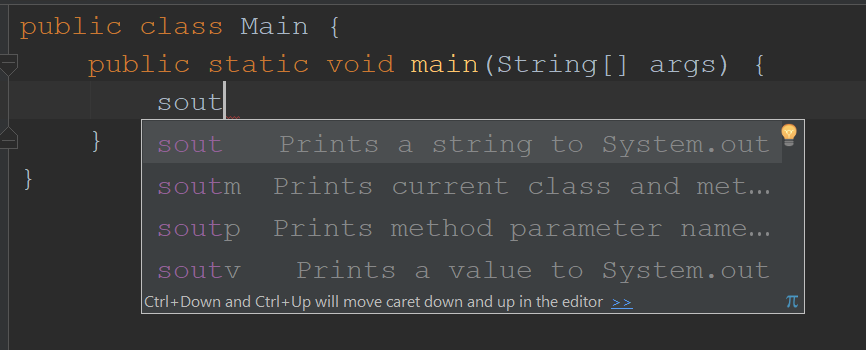
Hit tab or enter and it will create this:
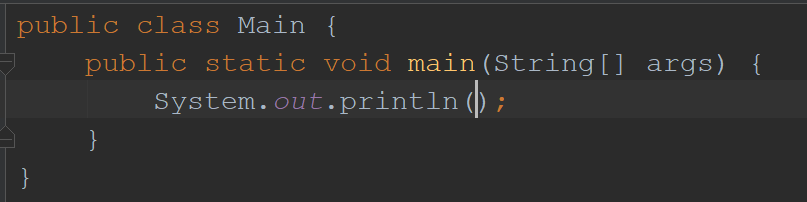
Some other ones to try, along with what they make:
psvm
public static void main(String[] args) {

}
fori
for (int i = 0; i < ; i++) {

}
Generate Constructors / Getters / Setters:
After you create a class and declare a few class variables, you can auto-generate some basic methods very quickly.
Start with something like this:
public class MyClass {
    String textInfo;
    int numberInfo;

}
Now put your cursor inside the curly braces, right click the code editor, and click generate (or alt+insert on keyboard).
Choose constructor. You will see a list of your two variables. Hold shift and click on the fields, or push shift + down arrow to select both. Hit OK.
This is a very fast way to generate the following constructor method:
public MyClass(String textInfo, int numberInfo) {
    this.textInfo = textInfo;
    this.numberInfo = numberInfo;
}
Now right click and generate again, and select “Getter and Setter.” Select both attributes and hit enter (or click OK).
That gives you all of these methods:
public String getTextInfo() {
    return textInfo;
}

public void setTextInfo(String textInfo) {
    this.textInfo = textInfo;
}

public int getNumberInfo() {
    return numberInfo;
}

public void setNumberInfo(int numberInfo) {
    this.numberInfo = numberInfo;
}
That’s a very fast way to create a new class with some of its basic methods already in place.