If you have a list of images, you can use Python to make them into an animated GIF image.
Let’s say you have a running animation consisting of three frames, each saved as a separate image file.
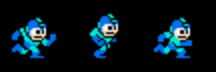
You will save the first frame of the image and add a list of every other frame while you save it.
The example below shows the options needed.
duration=250means you have a time delay of 250 milliseconds between each frame.loop=0tells it how how many times to repeat the loop, and zero tells it to loop forever.append_images = your_listis where you add the extra frames beyond the first frame. This must be a list containing PIL.Image objects.save_all=Trueis just required – it won’t work without this.- The saved file name needs a “gif” or “webp” file extension.
from PIL import Image
run1 = Image.open('run1.png')
run2 = Image.open('run2.png')
run3 = Image.open('run3.png')
other_frames = [run2, run3, run2]
run1.save('animation.gif',
          save_all=True,
          append_images = other_frames,
          duration=250,
          loop=0)
That gives this result:

In this case, we want the run sequence to repeat in this order:
run1, run2, run 3, run2
The run2 image is the one where Mega Man is in the tall part of his stride. That one always goes between the left and right versions of his stride, so that’s why run2 it’s in the list twice.